
How much should you spend on Google Ads?
The tempting answer is a number: $500, $1,000, $3,000, or perhaps a percentage of revenue.
None of those figures means much without context.
A sensible Google Ads budget depends on what a click costs in your market, how efficiently your website turns visitors into leads or sales, how many leads become customers, and what those customers are worth.
That is why a useful Google Ads cost estimator should answer two different questions:
What could my current budget produce?
and
What budget might I need to reach a specific business goal?
This guide shows you how to calculate both.
Google Ads Planning Tool
Google Ads Cost Estimator
Estimate clicks, leads, customers, acquisition cost, revenue and ROAS from a monthly ad budget—or work backwards from a lead or customer target.
Your assumptions
Estimated monthly outcome
Scenario sensitivity
See how changes in CPC and conversion performance can affect the economics.
| Scenario | CPC | Conv. rate | Close rate | Clicks | Leads | Customers | Revenue |
|---|
Conservative uses CPC +25%, conversion rate −25%, and close rate −20%. Strong uses CPC −15%, conversion rate +25%, and close rate +20%. Expected uses your inputs. These are sensitivity assumptions, not forecasts or guarantees.
Google Ads Cost Estimator: Quick Formula
If you already know your monthly budget, start with:
Monthly budget ÷ average CPC = estimated clicks
Then:
Estimated clicks × conversion rate = estimated leads
For a lead-generation business:
Estimated leads × close rate = estimated customers
Then:
Estimated customers × average customer value = estimated revenue
That gives you a basic forecast from budget to business outcome.
But there is another way to approach the calculation that is often more useful.
How Much Google Ads Budget Do You Need for a Target Number of Leads?
Instead of beginning with an arbitrary budget, work backwards from the outcome.
Use:
Target leads ÷ conversion rate = required clicks
Then:
Required clicks × average CPC = estimated budget required
Suppose you want approximately 20 leads.
Your expected website conversion rate is 5%, and relevant clicks are likely to cost around $8.
Required traffic:
20 ÷ 5% = 400 clicks
Required media budget:
400 × $8 = $3,200
That does not guarantee 20 leads.
It tells you that, under those assumptions, a $3,200 budget provides enough traffic for the mathematics to support roughly 20 conversions.
That is more useful than choosing $1,000 simply because $1,000 feels like a reasonable advertising number.
How Much Budget Do You Need for a Target Number of Customers?
You can take the same logic one step further.
Suppose the business wants 10 new customers.
Assume:
- 25% of qualified leads become customers
- the landing page converts 5% of visitors
- average CPC is $8
First calculate the number of leads required:
10 ÷ 25% = 40 leads
Then calculate the traffic required:
40 ÷ 5% = 800 clicks
Finally:
800 × $8 = $6,400 estimated ad spend
This gives us a useful reverse-budget formula:
Target customers ÷ close rate ÷ conversion rate × CPC = estimated media budget
It is still a forecast, not a promise.
But now the budget is connected to a business objective rather than an arbitrary spending limit.
What Inputs Does a Google Ads Cost Estimator Need?
A practical estimator does not need dozens of fields.
For lead generation, five inputs cover most of the core economics.
Input | What it tells you |
Monthly ad budget | How much you plan to spend with Google |
Average CPC | Approximate cost of one click |
Conversion rate | Percentage of visitors who become leads |
Lead-to-customer rate | Percentage of leads that become customers |
Customer value | Revenue generated by an average customer |
These numbers will rarely be exact before launch.
That is fine.
The purpose of an estimator is not to predict the future perfectly. It is to make the assumptions visible before money is spent.
Once a campaign generates enough data, replace assumptions with actual account, CRM, and sales figures.
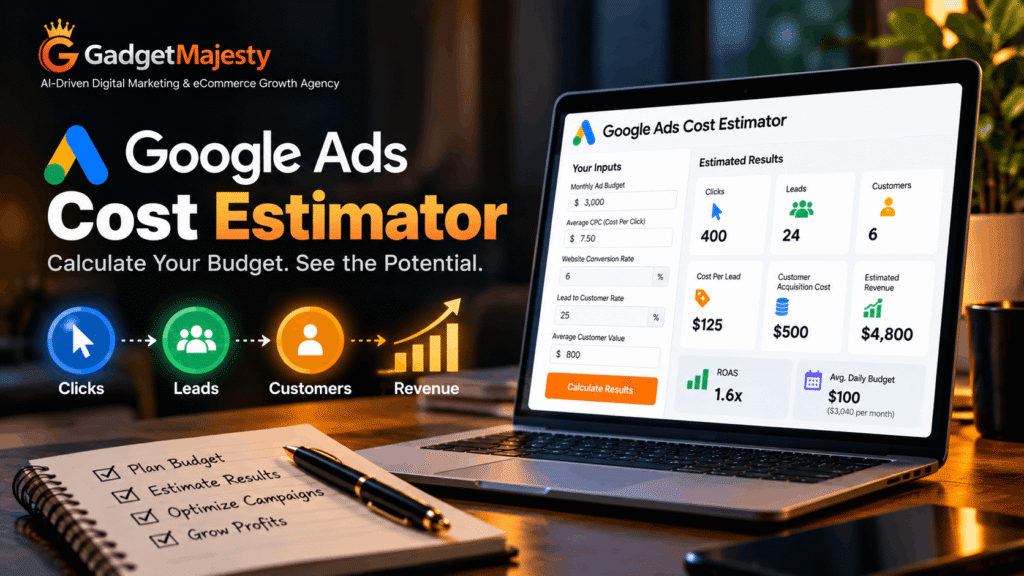
Example: What Could a $3,000 Google Ads Budget Produce?
Consider a local service business planning a monthly Search campaign.
Assume:
Monthly budget: $3,000
Average CPC: $7.50
Website conversion rate: 6%
Lead-to-customer rate: 25%
Average customer value: $800
Estimated clicks
$3,000 ÷ $7.50 = 400 clicks
Estimated leads
400 × 6% = 24 leads
Estimated cost per lead
$3,000 ÷ 24 = $125
Estimated customers
24 × 25% = 6 customers
Estimated customer acquisition cost
$3,000 ÷ 6 = $500
Estimated revenue
6 × $800 = $4,800
Projected ROAS
$4,800 ÷ $3,000 = 1.6x
That does not mean the campaign produces a 60% profit.
Revenue and profit are different.
Payroll, materials, fulfillment, overhead, sales costs, agency fees, refunds, repeat purchases, and gross margin all affect whether a 1.6x return is commercially attractive.
The estimator provides a decision model. It does not replace a profit-and-loss calculation.
Why One Forecast Is Not Enough
Paid advertising contains too many moving variables to model responsibly with one optimistic scenario.
A better approach is to calculate at least three.
Example Scenario Model
Assume a business has a $3,000 monthly budget.
Scenario | CPC | Conversion Rate | Close Rate | Clicks | Leads | Customers |
Conservative | $10 | 3% | 20% | 300 | 9 | 1.8 |
Expected | $7.50 | 6% | 25% | 400 | 24 | 6 |
Strong | $6 | 8% | 30% | 500 | 40 | 12 |
The purpose is not to convince yourself that the strong case will happen.
It is to see how sensitive the economics are to changes in CPC, conversion rate, and sales performance.
If the campaign only looks viable in the strongest scenario, that is a warning sign.
A healthier plan should still make commercial sense under reasonable assumptions.
How This Google Ads Cost Estimator Works
The model in this guide uses a simplified acquisition funnel:
Budget → Clicks → Leads → Customers → Revenue
Each stage depends on an input that can change.
CPC determines how much traffic the budget can purchase.
Conversion rate determines how much of that traffic becomes an enquiry or sale.
For lead-generation businesses, the close rate determines how much of that pipeline turns into actual customers.
Customer value then connects advertising activity with potential revenue.
This is deliberately simpler than Google’s auction and forecasting systems.
Google Keyword Planner can estimate traffic using factors such as budget, bids, seasonality, match type, historical search behavior, and historical ad quality.
Existing advertisers can also use Google’s Performance Planner to evaluate how changes in campaign settings and spend may affect forecasted outcomes.
Use those tools to improve your inputs.
Use your own first-party performance data whenever enough of it exists.
Where Should You Get an Estimated CPC?
For a new Search campaign, Google Keyword Planner is a practical starting point.
It can provide:
- keyword demand
- historical search trends
- top-of-page bid ranges
- click forecasts
- cost forecasts
- conversion forecasts where available
Treat these figures as estimates.
The actual CPC you pay depends on the auctions you enter and the competitive environment around those searches.
Once the campaign runs long enough to generate useful data, actual CPC becomes a better planning input than an external estimate.
How Does Google Decide What a Click Costs?
Google Search Ads do not operate from a fixed price list.
Advertisers enter auctions when eligible searches occur.
The amount you ultimately pay depends on multiple factors, including competition, bidding, ad quality, landing-page experience, search context, and the expected usefulness of ad assets.
This is why two companies targeting similar searches can experience different results.
It also explains why statements such as “Google Ads costs $5 per click” are not very useful without a market, keyword set, geography, campaign type, and timeframe.
Why CPC Alone Can Mislead You
A cheaper click is not automatically a better click.
Consider two campaigns.
Campaign A
CPC: $3
Conversion rate: 1%
Expected cost per lead:
$3 ÷ 1% = $300
Campaign B
CPC: $12
Conversion rate: 8%
Expected cost per lead:
$12 ÷ 8% = $150
Campaign B pays four times as much for every visitor.
Yet its expected lead cost is half as high.
That is why successful Google Ads management cannot focus only on reducing CPC.
The objective is not to buy the cheapest traffic.
It is to acquire commercially useful outcomes efficiently.
How to Estimate Google Ads Cost Per Lead
A simple pre-launch CPA calculation is:
Average CPC ÷ conversion rate = estimated cost per lead
For example:
$8 CPC ÷ 5% conversion rate = $160 estimated CPL
If CPC remains the same but the website converts at 8%:
$8 ÷ 8% = $100 estimated CPL
If conversion falls to 2%:
$8 ÷ 2% = $400 estimated CPL
Same click price.
Very different economics.
How Much Can Conversion Rate Change Your Required Budget?
This is one of the most important variables in the entire model.
Suppose a business wants 20 leads and expects to pay $10 per click.
At a 2% conversion rate
Required clicks:
20 ÷ 2% = 1,000 clicks
Required budget:
1,000 × $10 = $10,000
At a 5% conversion rate
20 ÷ 5% = 400 clicks
Budget:
400 × $10 = $4,000
At an 8% conversion rate
20 ÷ 8% = 250 clicks
Budget:
250 × $10 = $2,500
Nothing changed about CPC.
The difference came from what happened after the click.
That is why website performance and paid-media performance should not be treated as separate problems.
A stronger landing experience —or a professional small business website built around clear conversion paths—can reduce the amount of traffic required to reach the same lead target.
The Learning Budget Framework
Businesses often ask whether a proposed advertising budget is “enough.”
A more useful question is:
Will this budget generate enough conversion opportunities for us to learn anything meaningful?
We use a simple planning concept for that discussion:
Learning Budget = Target Conversion Sample × Estimated Cost Per Conversion
For example, suppose:
Estimated CPL = $150
You want approximately 10 lead conversions during the initial evaluation period.
10 × $150 = $1,500
That suggests a $1,500 media budget as a more useful testing reference than choosing $300 simply because it feels safer.
Important: This Is a Planning Framework, Not a Google Metric
There is no official Google rule stating that every campaign needs 10 conversions, 20 conversions, or any other universal number before it can be assessed.
Different bidding strategies, markets, conversion values, sales cycles, and account histories behave differently.
The framework simply prevents a common mistake: drawing strong conclusions from an extremely small sample.
If the expected CPL is $250 and the monthly budget is $250, one conversion can transform the apparent performance of the entire month.
That makes decision-making fragile.
The goal is to fund enough opportunity for the campaign to produce useful evidence.
When Is a Google Ads Budget Too Small?
A budget may be too constrained when the expected click volume gives the campaign very few opportunities to convert.
Suppose:
Monthly budget = $300
Expected CPC = $12
Expected traffic:
$300 ÷ $12 = 25 clicks
At a 5% conversion rate:
25 × 5% = 1.25 expected leads
The business may generate no enquiries one month and two the next.
That does not automatically mean the campaign is unstable or poorly managed.
The expected volume itself is very small.
In that situation, four options may make more sense than spreading the same budget across a large campaign:
1. Narrow the geography
Focus on the areas with the strongest commercial potential.
2. Promote fewer services
Put limited spend behind the most valuable or highest-intent offering.
3. Tighten keyword intent
Prioritize searches closer to enquiry or purchase behavior.
4. Improve conversion potential first
If the site struggles to turn existing traffic into enquiries, additional paid traffic may simply magnify the problem.
What Should a Small Business Spend on Google Ads?
There is no universally correct small-business Google Ads budget.
A better method is:
- Estimate relevant CPC.
- Estimate a realistic conversion rate.
- Calculate expected CPL or CPA.
- Decide how many conversions you need to evaluate.
- Multiply those figures to create a working test budget.
- Compare projected CAC against customer value and margin.
Consider two businesses with the same $1,000 budget.
Business A
Expected CPC: $2
Potential clicks:
$1,000 ÷ $2 = 500
Business B
Expected CPC: $25
Potential clicks:
$1,000 ÷ $25 = 40
The spending level is identical.
The amount of market feedback it can buy is not.
Google Ads Daily Budget vs Monthly Budget
Google normally asks advertisers to set an average daily budget for a campaign.
To translate a monthly figure into Google’s average daily format:
Monthly budget ÷ 30.4 = average daily budget
For example:
$3,040 ÷ 30.4 = $100 per day
The 30.4 figure represents Google’s average number of days in a month.
That does not mean Google will spend exactly $100 every day.
For most campaigns, daily spend can reach up to twice the average daily budget when Google identifies stronger traffic opportunities.
The standard monthly spending limit for most campaigns remains 30.4 times the average daily budget.
So a $100 average daily budget generally corresponds with:
Normal monthly spending limit: $3,040
and a potential daily spending limit of:
$200
This behavior is known as overdelivery.
Why Can Google Spend More Than the Daily Budget?
Search demand fluctuates.
A campaign might encounter strong commercial opportunities one day and relatively weak demand the next.
Google therefore treats the figure as an average daily budget rather than a rigid daily spend target for most campaigns.
The system may spend above the average on stronger days and less on others while operating within applicable spending limits.
This is important when translating a monthly media plan into Google Ads.
A $100 average daily budget should not be presented internally as “Google can never spend more than $100 in a day.”
That is not how the standard budget system works.
Budget Is Only One Constraint
A campaign can have enough money and still struggle to spend it effectively.
Examples include:
- low search volume
- narrow geography
- restrictive targeting
- weak Ad Rank
- limited eligible queries
- conversion-based bidding without enough useful signals
- unsuitable keyword choices
- poor offer-market fit
This means increasing the daily budget does not automatically create more conversions.
Demand and campaign quality still matter.
Website Quality Can Change the Budget You Need
Consider two businesses buying 500 clicks at the same cost.
Website A
Conversion rate: 2%
500 × 2% = 10 leads
Website B
Conversion rate: 7%
500 × 7% = 35 leads
Both advertisers purchased the same volume of traffic.
The second site produced 3.5 times as many enquiries.
This is why increasing spend should not be the automatic response to weak lead volume.
Sometimes the better investment is improving:
- offer clarity
- landing-page relevance
- mobile usability
- call-to-action placement
- trust signals
- form friction
- page speed
- message match between ad and page
A conversion-focused website can improve paid-search economics without reducing CPC at all.
Estimating Customer Acquisition Cost
A lead is not the final business outcome for most service companies.
Suppose:
CPL = $160
Lead-to-customer close rate = 25%
The expected customer acquisition cost becomes:
$160 ÷ 25% = $640
You can also calculate CAC directly:
Ad spend ÷ customers acquired = CAC
Now compare $640 against:
- first-sale revenue
- gross profit
- lifetime value
- fulfillment cost
- retention
- repeat purchase behavior
This produces a more commercially useful picture than cost per click alone.
Google Ads Cost Estimator for eCommerce
For eCommerce, the calculation is slightly different because the website usually records purchases directly.
Use:
Budget ÷ CPC = estimated clicks
Then:
Clicks × purchase conversion rate = estimated orders
Then:
Orders × average order value = estimated revenue
Suppose:
Monthly budget = $5,000
Average CPC = $2.50
Purchase conversion rate = 3%
Average order value = $120
Traffic
$5,000 ÷ $2.50 = 2,000 clicks
Orders
2,000 × 3% = 60 orders
Revenue
60 × $120 = $7,200
Projected ROAS
$7,200 ÷ $5,000 = 1.44x
Again, revenue is not profit.
A business with high gross margin, repeat orders, and strong customer lifetime value may evaluate 1.44x very differently from a store with thin margins and high fulfillment costs.
What Is a Good Google Ads ROAS?
There is no universal good ROAS.
A 4x return can be profitable for one advertiser and disappointing for another.
The required return depends on:
- gross margin
- repeat purchase rate
- customer lifetime value
- refunds
- operating expenses
- sales costs
- fulfillment
- agency or internal management costs
Instead of copying an industry benchmark, calculate your own break-even economics.
Suppose a new customer produces $1,000 in revenue but only $400 in gross profit before advertising.
A $500 acquisition cost would lose money on the first transaction.
However, if that customer typically produces another $2,000 in profitable repeat business, the long-term economics may look very different.
Context matters more than a generic ROAS target.
Revenue, ROAS and Profit Are Not the Same Thing
These three metrics are often mixed together.
Revenue
Total sales attributed to the campaign.
ROAS
Attributed revenue divided by ad spend.
Profit
What remains after relevant costs are deducted.
A campaign generating $20,000 from $5,000 in ad spend has a 4x ROAS.
But you cannot determine actual profitability from those two figures alone.
Any serious budget model should connect advertising data with financial reality.
How to Improve Your Estimate Before Launch
The quality of the forecast depends on the quality of its assumptions.
For CPC and search demand, start with Google Keyword Planner.
For conversion rate, look at existing website or landing-page data if the traffic source is reasonably comparable.
For close rate, use CRM or sales records rather than intuition.
For customer value, use realistic averages instead of the value of the best client the company has ever won.
If the Google Ads account already has meaningful historical performance, use actual results wherever possible.
Existing advertisers can also compare their assumptions with Performance Planner forecasts for supported campaigns.
Replace Assumptions With First-Party Data
A useful progression looks like this:
Before launch: market estimates
Early campaign: real CPC and click behavior
After conversion volume develops: actual CPL or CPA
After CRM integration: qualified-lead and close-rate data
Mature measurement: revenue, margin and lifetime-value analysis
The estimator should evolve as the quality of your information improves.
An advertiser running for six months should not keep using the same generic CPC assumptions it used before launch.
When Should You Increase Your Google Ads Budget?
Increasing spend makes the most sense when three conditions exist:
Performance is commercially acceptable
The campaign is generating customers, revenue, or qualified opportunities at an acceptable cost.
Additional demand is available
The campaign is budget constrained rather than simply lacking search volume.
Measurement is trustworthy
Conversions represent meaningful business outcomes rather than weak signals such as accidental clicks or low-quality form submissions.
If all three are true, additional budget may create incremental growth.
If they are not, scaling can simply make inefficiency more expensive.
When Should You Avoid Increasing Spend?
More budget is not the right fix when:
- lead quality is poor
- conversion tracking is unreliable
- sales teams reject most enquiries
- landing pages convert badly
- search terms show weak intent
- geographic targeting is too broad
- campaigns are sending traffic to unsuitable pages
- customer acquisition cost already exceeds acceptable economics
Fix the constraint before funding it more heavily.
How Should You Reallocate Budget Across Campaigns?
Do not distribute spend equally simply because every service deserves visibility.
Compare campaigns based on outcomes.
Useful measures include:
qualified lead cost
customer acquisition cost
conversion value
close rate
gross margin
revenue
lifetime value
A campaign generating $60 form submissions is not necessarily stronger than one producing 20.
If the 20 leads become 10 profitable customers while the 60 produce two, the smaller lead volume is commercially superior.
Budget allocation should follow business value, not dashboard activity.
Google Ads Cost Estimator Worksheet
Use this framework before approving a starting budget.
Metric | Formula |
Estimated clicks | Budget ÷ CPC |
Estimated leads | Clicks × conversion rate |
Estimated CPL | Budget ÷ leads |
Estimated customers | Leads × close rate |
Estimated CAC | Budget ÷ customers |
Estimated revenue | Customers × customer value |
Estimated ROAS | Revenue ÷ ad spend |
Required clicks for target leads | Target leads ÷ conversion rate |
Required budget for target leads | Required clicks × CPC |
Learning budget | Desired conversion sample × estimated CPA |
Run the worksheet under conservative, expected, and stronger assumptions.
If the business case survives reasonable variation, you have a much better basis for testing.
A Practical Google Ads Budget Decision Framework
Before launch, answer five questions.
1. What outcome are we actually buying?
Clicks are not the business objective.
Define whether success means leads, qualified opportunities, bookings, purchases, revenue, or customers.
2. What will one conversion probably cost?
Estimate CPC and conversion rate.
Use them to calculate an expected CPA.
3. How many conversions do we need before the test becomes useful?
Do not overstate statistical certainty, but avoid judging a campaign from one isolated conversion.
4. Can the business afford the expected acquisition cost?
Compare CAC with margin and customer value.
5. What will we do if the assumptions are wrong?
Decide in advance what would trigger:
- landing-page improvement
- targeting changes
- offer changes
- budget reallocation
- additional investment
- campaign pause
A budget becomes much more useful when it sits inside a decision process.
Frequently Asked Questions
How much should I spend on Google Ads per month?
There is no universal monthly amount. Estimate CPC, conversion rate, and the number of conversions you need, then calculate a budget that can generate enough traffic to test the opportunity meaningfully.
Is $10 per day enough for Google Ads?
It can be in a low-CPC, tightly targeted market. If relevant clicks cost $15 or $20, a $10 average daily budget may produce too little traffic to evaluate the campaign efficiently.
How do I calculate a Google Ads budget?
For a simple lead-generation forecast:
Target leads ÷ conversion rate × CPC = estimated budget required
If you already have a fixed amount:
Budget ÷ CPC = clicks
Then:
Clicks × conversion rate = estimated leads
How do I estimate Google Ads cost per lead?
Divide expected CPC by expected conversion rate.
For example:
$10 CPC ÷ 5% conversion rate = $200 estimated CPL
How do I estimate customer acquisition cost from Google Ads?
Calculate cost per lead, then account for your sales close rate.
If CPL is $200 and 25% of leads become customers:
$200 ÷ 25% = $800 estimated CAC
Why did Google spend more than my average daily budget?
For most campaigns, Google may spend up to twice the average daily budget on an individual day when traffic opportunities fluctuate. The standard monthly spending limit for most campaigns is 30.4 times the average daily budget.
Should I use competitor budgets as a benchmark?
Competitor spending can provide context, but it should not determine your budget. Your CPC, conversion rate, sales close rate, margins, and customer value are more important.
Is a high CPC bad?
Not necessarily. A higher-cost click can still be more profitable if it converts at a stronger rate or produces more valuable customers.
Should I increase my budget if Google says the campaign is limited by budget?
Not automatically. First check whether the campaign is producing commercially valuable results at an acceptable cost. Increasing budget makes more sense when additional spend scales something that already works.
Sources & Methodology
The calculations in this guide use standard advertising formulas for CPC, conversion rate, CPL, CAC, revenue, and ROAS. Google Ads-specific budgeting and forecasting information is based on official Google Ads documentation, including Keyword Planner, Performance Planner, average daily budget rules, spending limits, and Google’s ad auction guidance.
Final Takeaway
There is no useful default budget for Google Ads. A sensible starting point comes from the economics of the campaign: what relevant traffic is likely to cost, how well the website converts that traffic, and how many of those enquiries eventually become customers.
A smaller budget can work in a market with affordable clicks and strong conversion rates. In a competitive market, the same amount may generate too little activity to judge performance properly. That is why the number itself matters less than the amount of useful traffic and conversion data it can produce.
Use the estimator to set expectations before launch, then replace those assumptions with real campaign and sales data as it becomes available. Over time, the question becomes less about how much Google Ads costs and more about how much your business can profitably invest to acquire another customer.